Mac使用整理


摘要

本文旨在记录和汇总自己在工作以及学习过程中所使用的软件及其所遇问题的解决方案,以便日后所需.

可视化

  • Charles
  • Viusal Studio Code
  • QQ音乐
  • 微信
  • 网易云音乐
  • Chrome
  • 飞书
  • XMind
  • Dash
  • Navicat
  • Wireshark
  • Postman
  • Telegram
  • 百度网盘
  • 阿里云盘
  • Trello
  • Termius
  • Motrix
  • Downie
  • EasyConnect
  • Logi Options
  • 滴答清单
  • PDF Expert
  • IINA
  • Jetbrains家族
  • Office家族
  • Sensei
  • iTerm2
  • Pock
  • Bandizip
  • Barrier
  • fing
  • Typora
  • OpenInTerminal
  • Countdown Timer Plus
  • Mos
  • HHKB Keymap Tool
  • Alfred
  • Kronos Time Tra
  • Karabiner-Elements
  • Karabiner-EventViewer
  • Karabiner-VirtualHIDDevice-Manager
  • Magnet
  • iShot
  • Alacritty
  • stats
  • One Switch
  • Dash
  • BetterTouchTool
  • Transmit
  • Mountain Duck
  • Moment
  • Progressive Downloader
  • Pika
  • another-redis-desktop-manager
  • OmniGraffle
  • MonitorControl
  • NeatDownloadManager
  • Swish
  • App Cleaner & Uninstaller Pro
  • licecap
  • Clearview X
  • balenaEtcher
  • Reeder
  • HazeOver
  • json crack
  • itsycal (brew install itsycal) mac日历小工具
  • AlDente 充放电管理,需要先安装licence
  • LocalSend 跨端文件同步

终端

  • brew
  • ranger
  • fzf
  • htop
  • git
  • fd
  • ripgrep
  • glances(M1暂时没有适配)
  • ctop
  • lazydocker
  • colordiff
  • bat
  • httpie
  • ncdu
  • axel
  • glow或mdv,终端markdown文本阅读器
  • ipython
  • neofetch,查看系统配置
  • mas,查看商店安装的程序
  • lsd 直接alias ll=“lsd -lh”
  • yarn
  • npx
  • Slidev markdown版ppt
  • difftastic
  • android-platform-tools
  • scrcpy
  • socat
  • dua-cli
  • bottom
  • zoxide
  • privoxy
  • delta
  • Yazi(https://yazi-rs.github.io/docs/quick-start)
  • Posting(终端postman)

zsh配置

安装zsh插件

  • git-open: git clone https://github.com/paulirish/git-open.git $ZSH_CUSTOM/plugins/git-open
  • zsh-syntax-highlighting: git clone https://github.com/zsh-users/zsh-syntax-highlighting.git ${ZSH_CUSTOM:-~/.oh-my-zsh/custom}/plugins/zsh-syntax-highlighting
  • zsh-autosuggestions: git clone https://github.com/zsh-users/zsh-autosuggestions ${ZSH_CUSTOM:-~/.oh-my-zsh/custom}/plugins/zsh-autosuggestions

.zshrc

1
2
3
4
5
6
7
8
9
10
11
12
13
14
15
16
17
18
19
20
21
22
23
24
25
26
27
28
29
30
31
32
33
34
35
36
37
38
39
40
41
42
43
44
45
46
47
48
49
50
51
52
53
54
55
56
57
58
59
60
61
62
63
64
65
66
67
68
69
70
71
72
73
74
75
76
77
78
79
80
81
82
83
84
85
86
87
88
89
90
91
92
93
94
95
96
97
98
99
100
101
102
103
104
105
106
107
108
109
110
111
112
113
114
115
116
117
118
119
120
121
122
123
124
125
126
127
128
129
130
131
# Enable Powerlevel10k instant prompt. Should stay close to the top of ~/.zshrc.
# Initialization code that may require console input (password prompts, [y/n]
# confirmations, etc.) must go above this block; everything else may go below.
if [[ -r "${XDG_CACHE_HOME:-$HOME/.cache}/p10k-instant-prompt-${(%):-%n}.zsh" ]]; then
source "${XDG_CACHE_HOME:-$HOME/.cache}/p10k-instant-prompt-${(%):-%n}.zsh"
fi

# If you come from bash you might have to change your $PATH.
# export PATH=$HOME/bin:/usr/local/bin:$PATH

# Path to your oh-my-zsh installation.
export ZSH="/Users/robertwang/.oh-my-zsh"

# Set name of the theme to load --- if set to "random", it will
# load a random theme each time oh-my-zsh is loaded, in which case,
# to know which specific one was loaded, run: echo $RANDOM_THEME
# See https://github.com/ohmyzsh/ohmyzsh/wiki/Themes
ZSH_THEME="powerlevel10k/powerlevel10k"

# Set list of themes to pick from when loading at random
# Setting this variable when ZSH_THEME=random will cause zsh to load
# a theme from this variable instead of looking in $ZSH/themes/
# If set to an empty array, this variable will have no effect.
# ZSH_THEME_RANDOM_CANDIDATES=( "robbyrussell" "agnoster" )

# Uncomment the following line to use case-sensitive completion.
# CASE_SENSITIVE="true"

# Uncomment the following line to use hyphen-insensitive completion.
# Case-sensitive completion must be off. _ and - will be interchangeable.
# HYPHEN_INSENSITIVE="true"

# Uncomment one of the following lines to change the auto-update behavior
# zstyle ':omz:update' mode disabled # disable automatic updates
# zstyle ':omz:update' mode auto # update automatically without asking
# zstyle ':omz:update' mode reminder # just remind me to update when it's time

# Uncomment the following line to change how often to auto-update (in days).
# zstyle ':omz:update' frequency 13

# Uncomment the following line if pasting URLs and other text is messed up.
# DISABLE_MAGIC_FUNCTIONS="true"

# Uncomment the following line to disable colors in ls.
# DISABLE_LS_COLORS="true"

# Uncomment the following line to disable auto-setting terminal title.
# DISABLE_AUTO_TITLE="true"

# Uncomment the following line to enable command auto-correction.
# ENABLE_CORRECTION="true"

# Uncomment the following line to display red dots whilst waiting for completion.
# You can also set it to another string to have that shown instead of the default red dots.
# e.g. COMPLETION_WAITING_DOTS="%F{yellow}waiting...%f"
# Caution: this setting can cause issues with multiline prompts in zsh < 5.7.1 (see #5765)
# COMPLETION_WAITING_DOTS="true"

# Uncomment the following line if you want to disable marking untracked files
# under VCS as dirty. This makes repository status check for large repositories
# much, much faster.
# DISABLE_UNTRACKED_FILES_DIRTY="true"

# Uncomment the following line if you want to change the command execution time
# stamp shown in the history command output.
# You can set one of the optional three formats:
# "mm/dd/yyyy"|"dd.mm.yyyy"|"yyyy-mm-dd"
# or set a custom format using the strftime function format specifications,
# see 'man strftime' for details.
# HIST_STAMPS="mm/dd/yyyy"

# Would you like to use another custom folder than $ZSH/custom?
# ZSH_CUSTOM=/path/to/new-custom-folder

# Which plugins would you like to load?
# Standard plugins can be found in $ZSH/plugins/
# Custom plugins may be added to $ZSH_CUSTOM/plugins/
# Example format: plugins=(rails git textmate ruby lighthouse)
# Add wisely, as too many plugins slow down shell startup.
plugins=(git
z
extract
hitokoto
gitignore
cp
git-open
#safe-paste
sudo
zsh-syntax-highlighting
zsh-autosuggestions
history
tmuxinator
tmux
)

source $ZSH/oh-my-zsh.sh

# User configuration

# export MANPATH="/usr/local/man:$MANPATH"

# You may need to manually set your language environment
# export LANG=en_US.UTF-8

# Preferred editor for local and remote sessions
# if [[ -n $SSH_CONNECTION ]]; then
# export EDITOR='vim'
# else
# export EDITOR='mvim'
# fi

# Compilation flags
# export ARCHFLAGS="-arch x86_64"

# Set personal aliases, overriding those provided by oh-my-zsh libs,
# plugins, and themes. Aliases can be placed here, though oh-my-zsh
# users are encouraged to define aliases within the ZSH_CUSTOM folder.
# For a full list of active aliases, run `alias`.
#
# Example aliases
# alias zshconfig="mate ~/.zshrc"
# alias ohmyzsh="mate ~/.oh-my-zsh"

# To customize prompt, run `p10k configure` or edit ~/.p10k.zsh.
[[ ! -f ~/.p10k.zsh ]] || source ~/.p10k.zsh
export FZF_COMPLETION_TRIGGER='\'

[ -f ~/.fzf.zsh ] && source ~/.fzf.zsh

export FZF_DEFAULT_OPTS="--height 80% --layout=reverse --preview '(highlight -O ansi {} || cat {}) 2> /dev/null | head -500'"
alias setproxy='export https_proxy=http://192.168.50.77:20171 http_proxy=http://192.168.50.77:20171 all_proxy=socks5://192.168.50.77:20170'

ohmyzsh本地化

安装ohmyzsh

下载

1
wget https://gitee.com/mirrors/oh-my-zsh/raw/master/tools/install.sh

编辑

1
2
3
4
5
# Default settings
ZSH=${ZSH:-~/.oh-my-zsh}
REPO=${REPO:-mirrors/oh-my-zsh}
REMOTE=${REMOTE:-https://gitee.com/${REPO}.git}
BRANCH=${BRANCH:-master}

修改仓库地址

1
2
3
4
d ~/.oh-my-zsh
git remote set-url origin https://gitee.com/mirrors/oh-my-zsh.git
git pull
omz update //oh my zsh 更新

powerline10k

修改iTerm样式

iterm->preferences->Profiles->Session->Status bar enabled->Configure Status Bar可以设置Iterm上方展示系统信息等内容。

Mac内置键盘屏蔽

借助Karabiner可以实现在检测到外置键盘或鼠标存在的时候,底层屏蔽内置键盘的输入。

键盘映射

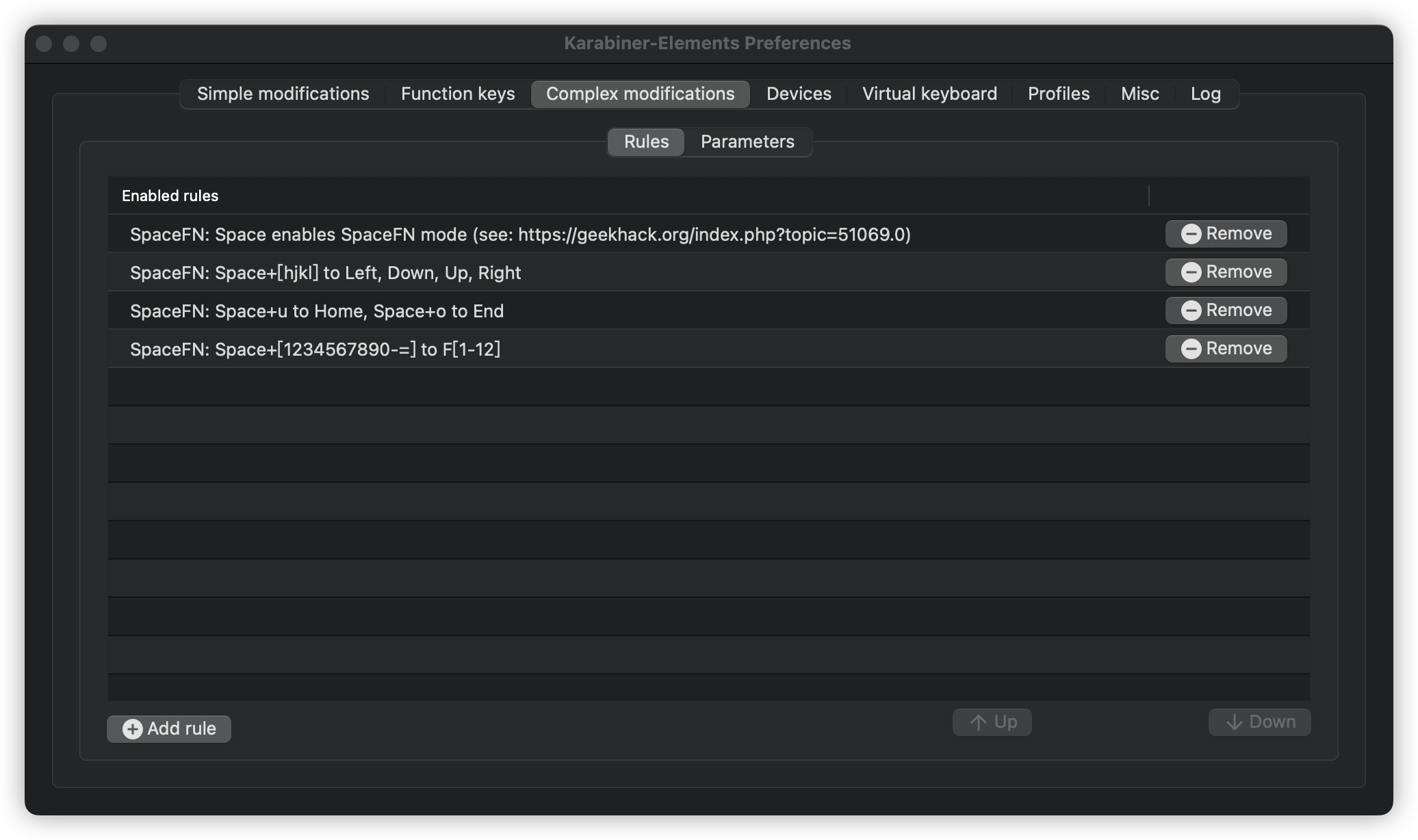
同样是借助Karabiner实现键盘映射的功能,单个按键简单映射直接在软件本身设置即可。针对组合键的映射,可以通过在.config/karabiner/assets/complex_modifications文件中编写任意文件名的json文件来实现。

1
2
3
4
5
6
7
8
9
10
11
12
13
14
15
16
17
18
19
20
21
22
23
24
25
26
27
28
29
30
31
32
33
34
35
36
37
38
39
40
41
42
43
44
45
46
47
48
49
50
51
52
53
54
55
56
57
58
59
60
61
62
63
64
65
66
67
68
69
70
71
72
73
74
75
76
77
78
79
80
81
82
83
84
85
86
87
88
89
90
91
92
93
94
95
{
"title": "vim",
"rules": [
{
"description": "option+hjkl;",
"manipulators": [
{
"description": "option+h",
"type": "basic",
"from": {
"key_code": "h",
"modifiers": {
"mandatory": [
"left_option"
]
}
},
"to": [
{
"key_code": "left_arrow"
}
]
},
{
"description": "option+j",
"type": "basic",
"from": {
"key_code": "j",
"modifiers": {
"mandatory": [
"left_option"
]
}
},
"to": [
{
"key_code": "down_arrow"
}
]
},
{
"description": "option+k",
"type": "basic",
"from": {
"key_code": "k",
"modifiers": {
"mandatory": [
"left_option"
]
}
},
"to": [
{
"key_code": "up_arrow"
}
]
},
{
"description": "option+l",
"type": "basic",
"from": {
"key_code": "l",
"modifiers": {
"mandatory": [
"left_option"
]
}
},
"to": [
{
"key_code": "right_arrow"
}
]
},
{
"description": "option+;",
"type": "basic",
"from": {
"key_code": "semicolon",
"modifiers": {
"mandatory": [
"left_option"
]
}
},
"to": [
{
"key_code": "return_or_enter"
}
]
}
]
}
]
}

推荐一些方便的键盘映射文件:

组合键映射.png

SSH

为了保持会话的长久链接可以在本地通过新增 .ssh/config文件中如下字段:

1
2
Host *
ServerAliveInterval 60

vim

安装 vimplus

1
2
3
git clone https://github.com/chxuan/vimplus.git ~/.vimplus
cd ~/.vimplus
./install.sh

直接安装完成直接会因为apple自研芯片的原因导致安装YouCompleteMe的过程中其实安装失败.可以使用 python3 install.py --all --system-libclang在YouCompleteMe文件夹中安装.

安装YouCompleteMe中可能出现Python headers are missing in /Applications/Xcode.app/Contents/Developer/Library/Frameworks/Python3.framework/Versions/3.7/Headers.的错误,只需要执行echo 'export PATH="/usr/local/bin:$PATH"' >> ~/.zshrc即可。这个问题的原因可以通过执行brew doctor发现。

ranger

安装

brew install ranger

插件

  • ranger图标
1
2
git clone https://github.com/alexanderjeurissen/ranger_devicons ~/.config/ranger/plugins/ranger_devicons
echo "default_linemode devicons" >> $HOME/.config/ranger/rc.conf
  • 图片预览

Add the following lines to your ~/.config/ranger/rc.conf:

1
2
set preview_images true
set preview_images_method iterm2
  • highlight
1
brew install highlight

fzf

安装

1
2
3
brew install fzf
#安装按键绑定与模糊补全
$(brew --prefix)/opt/fzf/install

配置

修改.zshrc

1
2
3
4
# 修改fzf的触发符号
export FZF_COMPLETION_TRIGGER='\'
# 修改fzf默认展示
export FZF_DEFAULT_OPTS="--height 80% --layout=reverse --preview '(highlight -O ansi {} || cat {}) 2> /dev/null | head -500'"

lrzsz

安装

1
brew install lrzsz

安装执行脚本

iterm2-send-zmodem.shiterm2-recv-zmodem.sh保存到/usr/local/bin目录下。

iterm2-send-zmodem.sh

1
2
3
4
5
6
7
8
9
10
11
12
13
14
15
16
17
18
19
20
21
22
23
24
25
#!/bin/bash
# Author: Matt Mastracci (matthew@mastracci.com)
# AppleScript from http://stackoverflow.com/questions/4309087/cancel-button-on-osascript-in-a-bash-script
# licensed under cc-wiki with attribution required
# Remainder of script public domain

osascript -e 'tell application "iTerm2" to version' > /dev/null 2>&1 && NAME=iTerm2 || NAME=iTerm
if [[ $NAME = "iTerm" ]]; then
FILE=$(osascript -e 'tell application "iTerm" to activate' -e 'tell application "iTerm" to set thefile to choose file with prompt "Choose a file to send"' -e "do shell script (\"echo \"&(quoted form of POSIX path of thefile as Unicode
else
FILE=$(osascript -e 'tell application "iTerm2" to activate' -e 'tell application "iTerm2" to set thefile to choose file with prompt "Choose a file to send"' -e "do shell script (\"echo \"&(quoted form of POSIX path of thefile as Unico
fi
if [[ $FILE = "" ]]; then
echo Cancelled.
# Send ZModem cancel
echo -e \\x18\\x18\\x18\\x18\\x18
sleep 1
echo
echo \# Cancelled transfer
else
/opt/homebrew/bin/sz "$FILE" --escape --binary --bufsize 4096
sleep 1
echo
echo \# Received "$FILE"
fi

iterm2-recv-zmodem.sh

1
2
3
4
5
6
7
8
9
10
11
12
13
14
15
16
17
18
19
20
21
22
23
24
25
26
27
28
#!/bin/bash
# Author: Matt Mastracci (matthew@mastracci.com)
# AppleScript from http://stackoverflow.com/questions/4309087/cancel-button-on-osascript-in-a-bash-script
# licensed under cc-wiki with attribution required
# Remainder of script public domain

osascript -e 'tell application "iTerm2" to version' > /dev/null 2>&1 && NAME=iTerm2 || NAME=iTerm
if [[ $NAME = "iTerm" ]]; then
FILE=$(osascript -e 'tell application "iTerm" to activate' -e 'tell application "iTerm" to set thefile to choose folder with prompt "Choose a folder to place received files in"' -e "do shell script (\"echo \"&(quoted form of POSIX pat
else
FILE=$(osascript -e 'tell application "iTerm2" to activate' -e 'tell application "iTerm2" to set thefile to choose folder with prompt "Choose a folder to place received files in"' -e "do shell script (\"echo \"&(quoted form of POSIX p
fi

if [[ $FILE = "" ]]; then
echo Cancelled.
# Send ZModem cancel
echo -e \\x18\\x18\\x18\\x18\\x18
sleep 1
echo
echo \# Cancelled transfer
else
cd "$FILE"
/opt/homebrew/bin/rz --rename --escape --binary --bufsize 4096
sleep 1
echo
echo
echo \# Sent \-\> $FILE
fi

授予执行权限

1
sudo chmod +x /usr/local/bin/iterm2-*

设置iterm的trigger

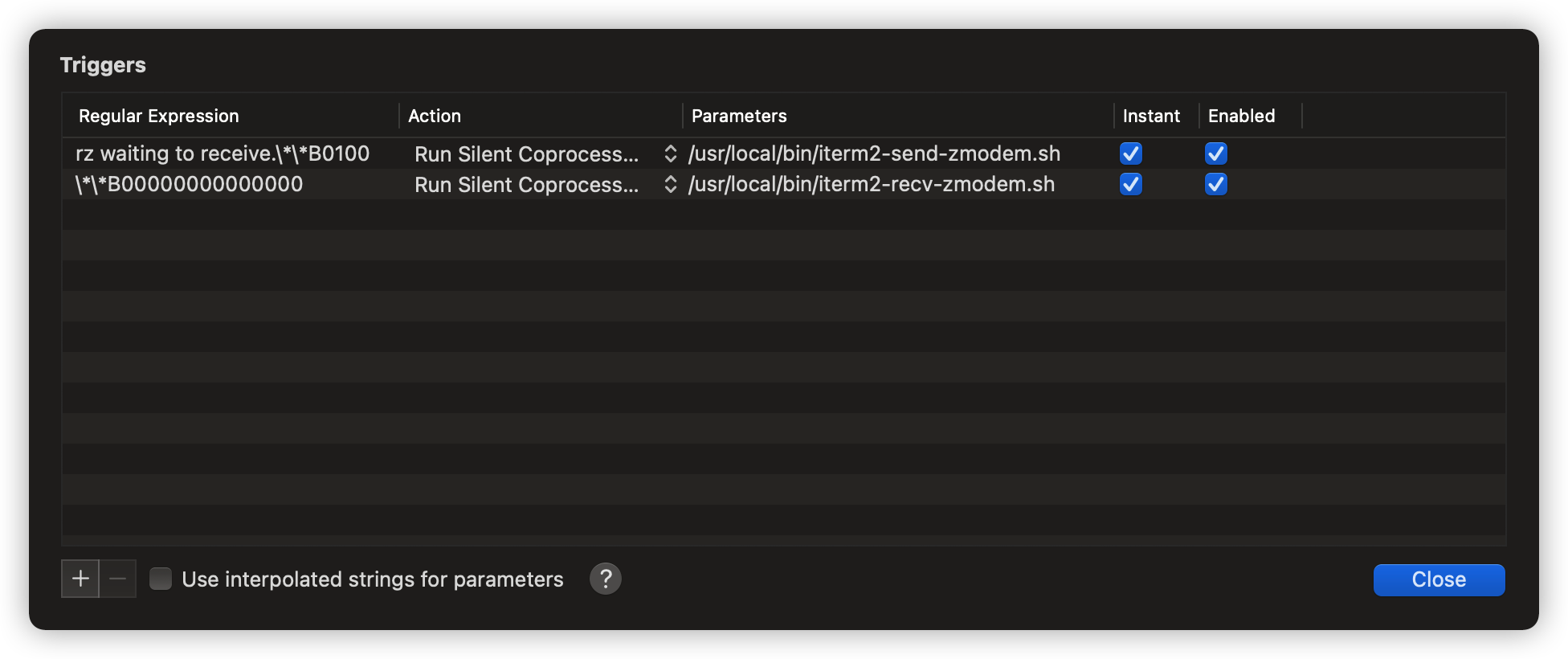
设置Iterm2的Tirgger特性,Preferences->Profiles->Default->Advanced->Trigged->Edit

1
2
3
4
5
6
7
8
9
Regular expression: rz waiting to receive.\*\*B0100
Action: Run Silent Coprocess
Parameters: /usr/local/bin/iterm2-send-zmodem.sh
Instant: checked

Regular expression: \*\*B00000000000000
Action: Run Silent Coprocess
Parameters: /usr/local/bin/iterm2-recv-zmodem.sh
Instant: checked

lrzsz设置iterm的trigger.png

使用

  • 上传文件:rz
  • 下载文件:sz + filename

Autojump

  • 安装brew install autojump
  • 配置进.zshrc加入[[ -s brew --prefix/etc/autojump.sh ]] && . brew --prefix/etc/autojump.sh

excalidraw

直接把excalidraw的官方git仓库直接部署到vercel中,利用chrome中的插件XSwitch配置如下内容:

1
2
3
4
5
6
7
8
9
10
11
12
13
14
15
16
17
18
19
{
"proxy": [
[
"https://draw.buerlog.top/Cascadia.woff2",
"https://ajietextd.github.io/chinese.woff2"
],[
"https://draw.buerlog.top/Virgil.woff2",
"https://anhoder.github.io/media/excalidraw/FG_Virgil.woff2"
],
[
"https://excalidraw.com/Cascadia.woff2",
"https://ajietextd.github.io/chinese.woff2"
],
[
"https://excalidraw.com/Virgil.woff2",
"https://anhoder.github.io/media/excalidraw/FG_Virgil.woff2"
]
],
}

delta 配置

1
2
3
4
5
6
7
8
9
10
11
12
13
14
15
16
17
18
19
20
21
22
23
24
[core]
pager = delta

[interactive]
diffFilter = delta --color-only --features=interactive

[delta]
features = decorations
side-by-side = true
line-numbers = true
hyperlinks = true
hyperlinks-file-link-format = "vscode://file/{path}:{line}"

[delta "interactive"]
keep-plus-minus-markers = false

[delta "decorations"]
commit-decoration-style = blue ol
commit-style = raw
file-style = omit
hunk-header-decoration-style = blue box
hunk-header-file-style = red
hunk-header-line-number-style = "#067a00"
hunk-header-style = file line-number syntax

Alfred

YoudaoTranslate

Alfred-codezm-workflows-timestamp-convert

alfred-terminalfinder

coversion

IP Address

Alfred-BaseConversion

Alfred-Workflow

查看Mac整体信息

打开系统信息.app就可以查看具体信息以及电脑中安装的所有软件的版本。

编译报错

当Mac OS进行更新时,可能会导致更新后的系统中原本在Clion等IDE软件中原本的组件的缓存无法找到相应资源,出现如下错误:

1
2
3
#include_next <wchar.h>
^~~~~~~~~
1 error generated.

此时只需要清空IDE中的缓存即可。

在Clion中就是文件->清除缓存

yazi

install

brew install yazi ffmpegthumbnailer unar jq poppler fd ripgrep fzf zoxide font-symbols-only-nerd-font

Zsh 配置,满足在退出时更改当前工作目录

1
2
3
4
5
6
7
8
function yy() {
local tmp="$(mktemp -t "yazi-cwd.XXXXXX")"
yazi "$@" --cwd-file="$tmp"
if cwd="$(cat -- "$tmp")" && [ -n "$cwd" ] && [ "$cwd" != "$PWD" ]; then
cd -- "$cwd"
fi
rm -f -- "$tmp"
}

中英文输入法切换

在设置中的键盘里面选择fn切换输入法,关闭capsLock切换输入法.这样多台mac之间通用控制都可以切换输入法.

下面是karabiner对应的配置文件:

1
2
3
4
5
6
7
8
9
10
11
12
13
14
15
16
17
18
19
20
21
22
23
24
25
26
27
28
29
30
31
32
33
34
35
36
37
{
"description": "Us shift to Change to/from English input. (Need to enable MacOS built in Option: Use fn Key to switch to and from ABC.)",
"manipulators": [
{
"from": {
"key_code": "left_shift"
},
"to": [
{
"key_code": "left_shift"
}
],
"to_if_alone": [
{
"key_code": "fn"
}
],
"type": "basic"
},
{
"from": {
"key_code": "right_shift"
},
"to": [
{
"key_code": "right_shift"
}
],
"to_if_alone": [
{
"key_code": "fn"
}
],
"type": "basic"
}
]
}

vscode下cpp配置

settings.json配置

1
2
3
4
5
6
7
8
9
10
11
12
13
14
15
16
17
18
19
20
21
22
23
24
25
26
27
28
29
30
31
32
33
34
35
36
37
38
39
40
41
42
43
44
45
46
47
48
49
50
51
52
53
54
55
56
57
58
59
60
61
62
63
64
65
66
67
68
69
70
71
72
73
74
75
76
77
78
79
80
81
82
83
84
85
86
87
88
89
90
91
92
93
94
95
96
97
98
99
100
101
102
103
104
105
106
107
108
109
110
111
112
113
114
115
116
117
118
119
120
121
122
123
124
125
126
127
128
129
130
131
132
133
134
135
136
137
138
139
140
141
142
143
144
145
146
147
148
149
150
151
152
153
154
155
156
157
158
159
160
161
162
163
164
165
166
167
168
169
170
171
172
173
174
175
176
177
178
179
180
181
182
183
184
185
186
187
188
189
190
191
192
193
194
195
196
197
198
199
200
201
202
203
204
205
206
207
208
209
210
211
212
213
214
215
216
217
218
219
220
221
222
223
224
225
226
227
228
229
230
231
232
233
234
235
236
237
238
239
240
241
242
243
244
245
246
247
248
249
250
251
252
253
254
255
256
257
258
259
260
261
262
263
264
265
266
267
268
269
270
271
272
273
274
275
276
277
278
279
280
281
282
283
284
285
286
287
288
289
290
291
292
293
294
295
296
297
298
299
300
301
302
303
{

"files.autoSave": "onFocusChange",

"editor.fontSize": 14,

"python.defaultInterpreterPath": "/opt/homebrew/bin/python3",

"leetcode.endpoint": "leetcode-cn",

"[sql]": {

"editor.defaultFormatter": "adpyke.vscode-sql-formatter"

},

"editor.unicodeHighlight.allowedCharacters": {

"�": true

},

"window.zoomLevel": 1,

"editor.fontFamily": "Hack Nerd Font",

"gitlens.advanced.messages": {

"suppressGitVersionWarning": true

},

"go.toolsManagement.autoUpdate": true,

"redhat.telemetry.enabled": true,

"editor.inlineSuggest.enabled": true,

"go.alternateTools": {

},

"experimentalWorkspaceModule ": true,

"gopls": {

"experimentalWorkspaceModule": true

},

"files.watcherExclude": {

"**/.bloop": true,

"**/.metals": true,

"**/.ammonite": true

},

"vs-kubernetes": {

"vscode-kubernetes.kubectl-path.mac": "/Users/didi/.vs-kubernetes/tools/kubectl/kubectl",

"vscode-kubernetes.minikube-path.mac": "/Users/didi/.vs-kubernetes/tools/minikube/darwin-arm64/minikube",

"vscode-kubernetes.helm-path.mac": "/Users/didi/.vs-kubernetes/tools/helm/darwin-arm64/helm"

},

"go.testFlags": [

"-v"

],

"code-runner.executorMap": {

"javascript": "node",

"java": "cd $dir && javac $fileName && java $fileNameWithoutExt",

"c": "cd $dir && gcc $fileName -o $fileNameWithoutExt && $dir$fileNameWithoutExt",

"cpp": "cd $dir && g++ -std=c++23 $fileName -o $fileNameWithoutExt && $dir$fileNameWithoutExt",

"objective-c": "cd $dir && gcc -framework Cocoa $fileName -o $fileNameWithoutExt && $dir$fileNameWithoutExt",

"php": "php",

"python": "python3.10",

"perl": "perl",

"perl6": "perl6",

"ruby": "ruby",

"go": "go run",

"lua": "lua",

"groovy": "groovy",

"powershell": "powershell -ExecutionPolicy ByPass -File",

"bat": "cmd /c",

"shellscript": "bash",

"fsharp": "fsi",

"csharp": "scriptcs",

"vbscript": "cscript //Nologo",

"typescript": "ts-node",

"coffeescript": "coffee",

"scala": "scala",

"swift": "swift",

"julia": "julia",

"crystal": "crystal",

"ocaml": "ocaml",

"r": "Rscript",

"applescript": "osascript",

"clojure": "lein exec",

"haxe": "haxe --cwd $dirWithoutTrailingSlash --run $fileNameWithoutExt",

"rust": "cd $dir && rustc $fileName && $dir$fileNameWithoutExt",

"racket": "racket",

"scheme": "csi -script",

"ahk": "autohotkey",

"autoit": "autoit3",

"dart": "dart",

"pascal": "cd $dir && fpc $fileName && $dir$fileNameWithoutExt",

"d": "cd $dir && dmd $fileName && $dir$fileNameWithoutExt",

"haskell": "runhaskell",

"nim": "nim compile --verbosity:0 --hints:off --run",

"lisp": "sbcl --script",

"kit": "kitc --run",

"v": "v run",

"sass": "sass --style expanded",

"scss": "scss --style expanded",

"less": "cd $dir && lessc $fileName $fileNameWithoutExt.css",

"FortranFreeForm": "cd $dir && gfortran $fileName -o $fileNameWithoutExt && $dir$fileNameWithoutExt",

"fortran-modern": "cd $dir && gfortran $fileName -o $fileNameWithoutExt && $dir$fileNameWithoutExt",

"fortran_fixed-form": "cd $dir && gfortran $fileName -o $fileNameWithoutExt && $dir$fileNameWithoutExt",

"fortran": "cd $dir && gfortran $fileName -o $fileNameWithoutExt && $dir$fileNameWithoutExt",

"sml": "cd $dir && sml $fileName"

},

"github.copilot.enable": {

"*": false,

"plaintext": true,

"markdown": false,

"scminput": false,

"yaml": false,

"cpp": false

},

"git.autofetch": true,

"git.ignoreLegacyWarning": true,

"workbench.editor.wrapTabs": true,

"leetcode.defaultLanguage": "cpp",

"leetcode.filePath": {

"default": {

"folder": "",

"filename": "${id}.${kebab-case-name}.${ext}"

}

},

"leetcode.hint.commandShortcut": false,

"[python]": {

"editor.formatOnType": true

},

"editor.unicodeHighlight.invisibleCharacters": false,

"editor.unicodeHighlight.ambiguousCharacters": false,

"[vue]": {

"editor.defaultFormatter": "octref.vetur"

},

"editor.unicodeHighlight.nonBasicASCII": false,

"vscode-system-monitor.configuration.monitor.cpu.enabled": true,

"vscode-system-monitor.configuration.monitor.network.enabled": true,

"vscode-system-monitor.configuration.monitor.memory.enabled": true,

"[html]": {

"editor.defaultFormatter": "esbenp.prettier-vscode"

},

"lldb.suppressUpdateNotifications": true,

"leetcode.workspaceFolder": "/Users/robertwang/Lab/leetcode_test",

"leetcode.hint.configWebviewMarkdown": false,

"leetcode.hint.commentDescription": false,

"C_Cpp.inlayHints.autoDeclarationTypes.enabled": true,

"C_Cpp.inlayHints.autoDeclarationTypes.showOnLeft": true,

"[cpp]": {

"editor.defaultFormatter": "llvm-vs-code-extensions.vscode-clangd"

},

"C_Cpp.default.cppStandard": "c++23",

"C_Cpp.codeAnalysis.clangTidy.args": [

"-std=c++23"

],

"C_Cpp.codeAnalysis.clangTidy.enabled": true,

"codeium.enableConfig": {

"*": true,

"cpp": false

},

"leetcode.nodePath": "/opt/homebrew/bin/node",

"docker.extension.enableComposeLanguageServer": false,

"workbench.colorTheme": "Everforest Dark",

"clangd.arguments": [

"--log=verbose", // 启用详细日志(可选,用于调试)

"--background-index" // 后台索引,不影响配置读取

// 避免添加与全局配置冲突的参数(如 -std=c++14)

]

}

mac下clangd 只认 ~/Library/Preferences/clangd/config.yaml.因此全局还需要

1
2
3
# 终端执行,创建配置文件(若已存在则直接编辑)
mkdir -p ~/Library/Preferences/clangd
touch ~/Library/Preferences/clangd/config.yaml
1
2
3
CompileFlags: 
Add: [-std=c++23] # 启用 C++20 标准(包含 contains 方法)
Remove: [-std=c++*] # 移除低版本标准(如 C++14),避免冲突

参考资料

  1. Fuzzy finder(fzf+vim) 使用全指南,2018
  2. iterm2 rz与sz的功能,2019

文章作者: 不二
版权声明: 本博客所有文章除特別声明外,均采用 CC BY 4.0 许可协议。转载请注明来源 不二 !
  目录